A GHL custom dashboard worth starting the shift on
A GHL custom dashboard turns the page every sub-account opens on into a welcome screen: a greeting, a live clock, quick links and styled widgets in brand colors. 18 designs, in Premium and up.
18 dashboards, one click each
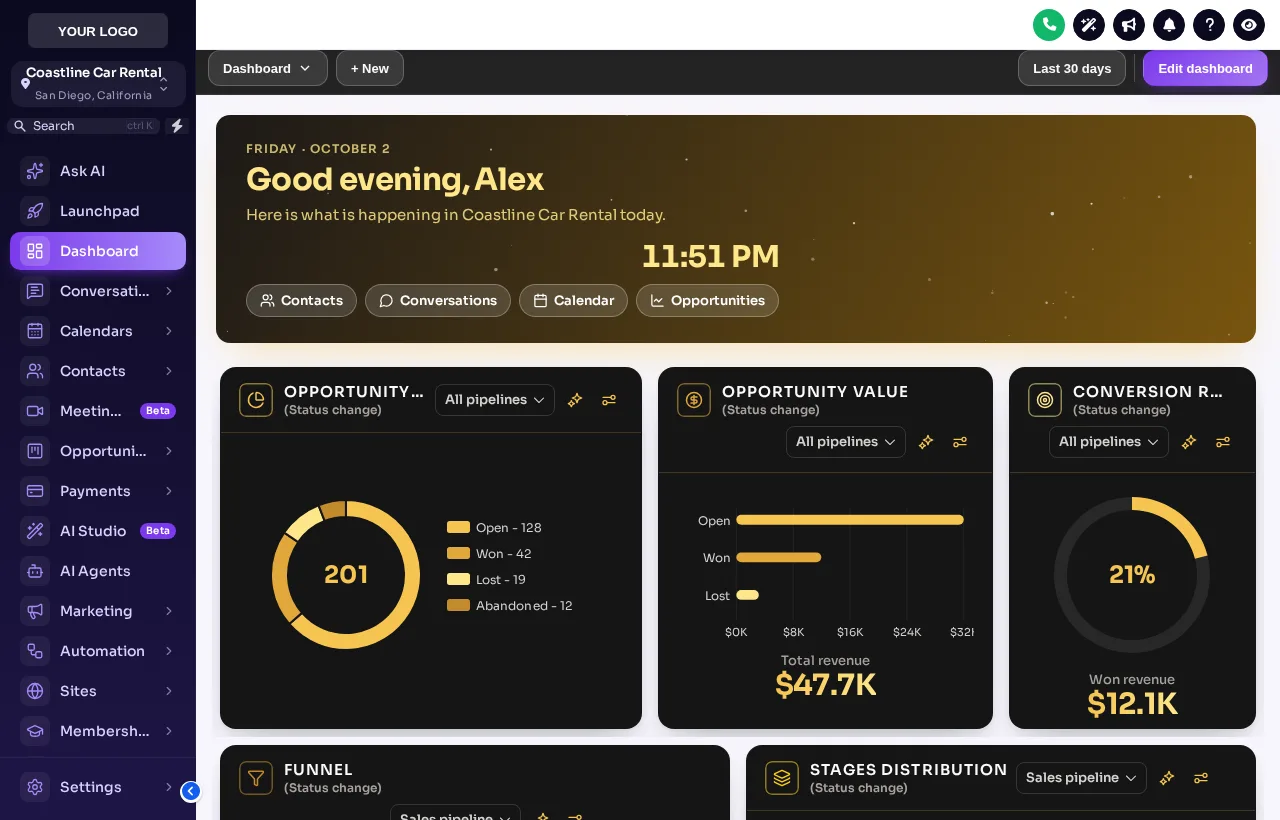
Obsidian Gold on the Midnight Sky sidebar is loaded first. Filter by dark, light or photo and watch the live clock in the banner.
What changes with a GoHighLevel dashboard theme
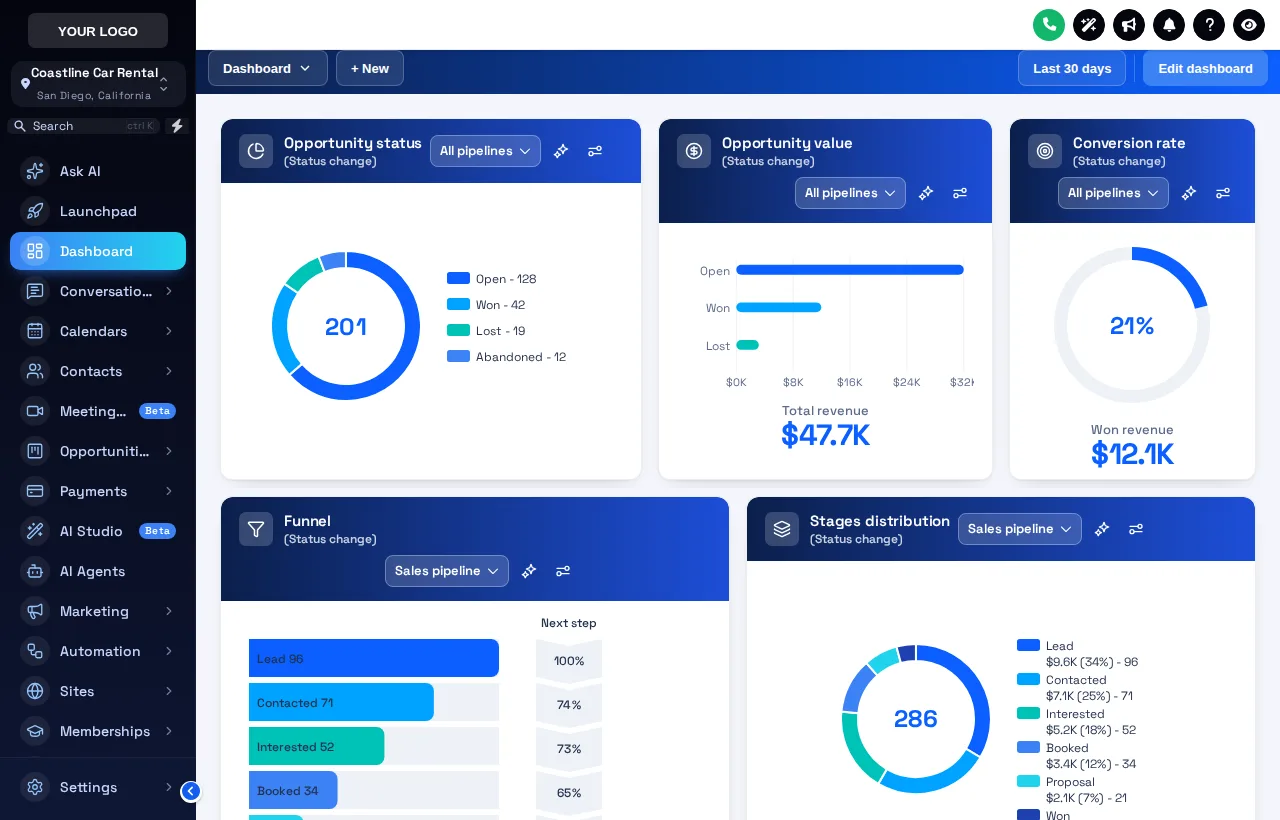
The dashboard designer adds a welcome banner with the user's name, the date, a live clock and quick links, and restyles every widget card and chart in your colors. Your widgets, data and dashboard settings stay untouched.
At 7am the counter opens. Instead of a grid of grey charts, staff see "Good morning, Dana", the date, the clock and one-click links to Conversations and Calendar, where the overnight inquiries and today's pickups are waiting. The pipeline chart shows the reservation stages in brand colors that match the board.
For an agency, a polished dashboard is the screen a rental client screenshots and shares. It is also the easiest way to show a new client their account is set up for them.
- Designs
- 18 (13 light, 5 dark)
- Photo banners
- 6, with your own image
- Welcome banner
- Greeting, sub-account name, date, live clock, quick links
- Chart colors
- By position, from the design or your brand color
- Class
- Premium and above
Ocean Pro on the Deep Space sidebar
How to set up a GHL welcome banner
- Pick
Pick a dashboard design
Choose from 18 designs: plain light, dark, or one of 6 with a photo welcome banner.
- Write
Write the welcome banner
Set the greeting and the line under it, and keep or remove the live clock and the quick links to Contacts, Conversations, Calendar and Opportunities.
- Color
Match the chart colors
Let the design build chart colors from your brand color, or use its own palette. Colors go out by position, so any pipeline fits.
- Publish
Publish to every sub-account
Publish and each sub-account dashboard shows the new design on its next page load. Widgets and numbers stay as they were.
The dashboard designer starts at Premium
Does not include this module. Upgrade to a higher class for it.
Includes dashboard designer (18 designs).
Includes dashboard designer (18 designs).
GHL custom dashboard FAQs
Can you customize the GoHighLevel dashboard?
Yes, with Premium or Fleet Luxury. The dashboard designer restyles the sub-account dashboard: its cards, charts, numbers, top bar, background and a welcome banner above the widgets, with 18 designs to start from.
Does it change my widgets or numbers?
No. It only changes how the dashboard looks. The widgets, their data and GoHighLevel's own dashboard settings stay exactly as they are.
What does the welcome banner show?
A greeting with the signed-in user's first name, the sub-account name, the date, a live clock and quick links to Contacts, Conversations, Calendar and Opportunities. You can change the wording and turn the clock and links off.
Which designs have a photo banner?
Northern Lights, Pastel Sky, City Nights, Lagoon, Golden Hour, Liquid 3D. Photo designs let you upload your own image, for example a shot of your lot or fleet, with a shade setting so the text stays readable.
Will chart colors work with my reservation pipeline?
Yes. Colors are given out by position: first color for the first stage or status, second for the next. Any pipeline with any number of stages gets a color for each.
Does the dashboard design work with my theme?
Yes. It sits on top of your theme, so the sidebar and header keep their look. Use the Sidebar chips in the test drive to see combinations.
Which class includes the dashboard designer?
Premium ($427) and Fleet Luxury. Economy restyles the dashboard through the theme only, without the designer and its welcome banner.
Can each sub-account have its own banner text?
The greeting uses each signed-in user's first name and each sub-account's own name automatically, so one design reads personally everywhere.
Can I try the designs first?
Yes. The test drive on this page applies each of the 18 real templates to a copy of the GoHighLevel dashboard, live.
Related pages
Dashboards and pipelines with Premium
The dashboard designer comes with the pipeline designer, mega menus and the contact actions bar. $427 once.
GoHighLevel and HighLevel are trademarks of HighLevel Inc. GHL Car Rental Snapshot is independent and is not affiliated with, endorsed by or sponsored by HighLevel. The GHL Customizer runs on the GHL Customer Care customizer platform; accounts sold here are created on that platform.