
GoHighLevel customizer setup, checkout to live
GoHighLevel customizer setup is four steps: pay once, get your login by email, design in the live editor, and paste one line of code into your agency settings. The paste takes about two minutes and you only do it once.
- Stop 1 · checkout
Choose a class and pay once
- Stop 2 · inbox
Get your login by email
- Stop 3 · editor
Design in the live editor
- Stop 4 · GoHighLevel
Paste one line into GoHighLevel
How to install a GHL theme without a developer
Install a GHL theme by pasting the customizer's loader line into Agency Settings, Company, White Label, Custom JS, and its login line into Custom CSS. Save, refresh, and every sub-account shows your design. Later edits publish instantly.
Stop 1: Choose a class and pay once
Pick Economy, Premium or Fleet Luxury on the pricing page, enter your name and email, and pay by card on Stripe's secure checkout. No GoHighLevel details are asked for.
Stop 2: Get your login by email
Your login (email and a temporary password) is emailed as soon as payment completes, usually within minutes and never later than 24 hours. If anything fails, our team creates the account by hand within 24 hours. Sign in at customizer.ghlcustomercare.com and change the temporary password.
Stop 3: Design in the live editor
Pick a theme, login design, menu layout and, depending on your class, dashboards, pipeline boards and widgets. Every change shows on a live preview before you publish.
Stop 4: Paste one line into GoHighLevel
Copy the loader line into Agency Settings, Company, White Label, Custom JS, and the login line into Custom CSS. Save. Your agency view and every sub-account pick it up on the next page load.
What you never have to do
- Hand over your GoHighLevel password. We never ask for your GoHighLevel login.
- Edit GHL custom CSS by hand or keep a stylesheet up to date.
- Book a call or wait for a designer. We do not design or install it for you; the help docs and our support team are there if you get stuck..
The safety equipment
The features that keep a live GoHighLevel account calm while you change how it looks.
Screen-share without leaking renter data
Blur contact details in one click on sales calls and recorded demos.
ECARIn every class, from EconomyRoll back a bad idea
Keep your recent published versions and restore any of them.
ECARIn every class, from EconomyYour code only runs where you say
Lock the loader to your own GoHighLevel and website domains.
ECARIn every class, from EconomyTell every user at once
Messages inside GoHighLevel, plus sub-account self-service for their own look.
PCARIncluded from Premium classYour name on the editor
Your logo, colors and name on the customizer your team and clients log in to.
LFARIncluded from Fleet Luxury classSame account, new paint
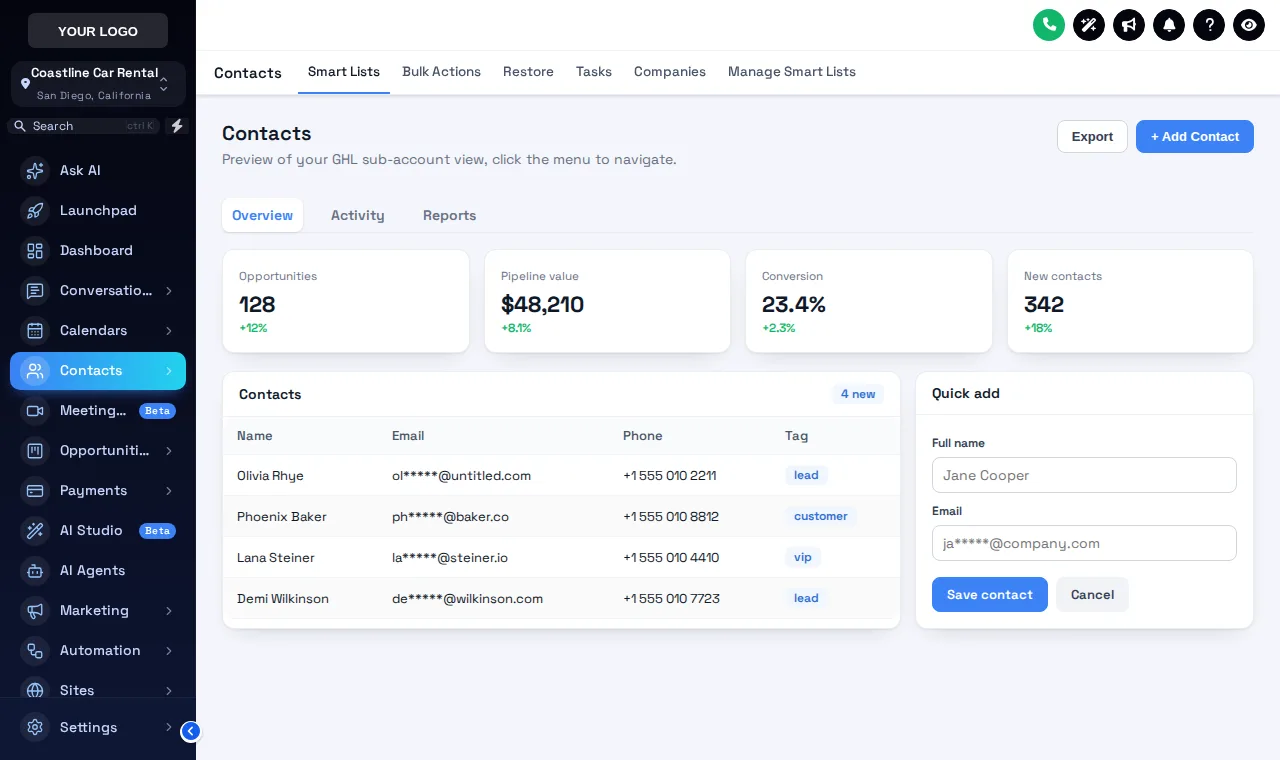
The Deep Space theme on the contacts list of a sample rental sub-account. Nothing in the account changed except the look: same contacts, same workflows, same pipeline.
Prefer to see it move? Open the theme test drive.
GoHighLevel customizer setup FAQs
How long does GoHighLevel customizer setup take?
The install itself takes about two minutes: one script line in Custom JS and one CSS line for the login page, pasted once. Designing your look takes as long as you like; most people have a theme and login page live the same afternoon.
Where exactly do I paste the code?
In GoHighLevel go to Agency Settings, then Company, then the White Label area. The loader line goes in Custom JS. The login line goes in Custom CSS, because GoHighLevel does not run custom scripts before someone signs in, but it does load custom CSS.
Do I need to re-install after every change?
No. The loader fetches your latest published version each time a page loads, so changes go live instantly with nothing to paste again.
Do I need agency admin access?
Yes. Custom JS and Custom CSS live in agency settings, so the person pasting the code needs access to those settings. Nobody else needs it, and we never ask for your GoHighLevel login.
What if the login email does not arrive?
Check spam first. If anything fails, our team creates the account by hand within 24 hours. If 24 hours pass, contact support with the email you used at checkout.
What is privacy mode?
Privacy mode blurs contact details with one click when you share your screen, which is handy on sales calls and recorded demos. It is included in every class from Economy.
Can I lock the customizer to my own domains?
Yes. Each account has a list of allowed domains: 5 on Economy, 10 on Premium and 25 on Fleet Luxury.
Can I undo a change?
Yes. Version history keeps your recent published versions (5 on Economy, 10 on the higher classes), so you can roll back with a click.
What are announcements and sub-account self-service?
They come with Premium. Announcements put a message in front of your users inside GoHighLevel. Self-service lets sub-accounts adjust allowed parts of their own look without asking the agency.
What does the white-label editor do?
With Fleet Luxury the customizer itself shows your logo, colors and name, so clients and staff who log in to the editor see your brand rather than ours.
Will it slow GoHighLevel down?
The loader is a small script that applies styles as the page loads. Previews run the same engine, so the test drives on this site give you a fair idea of how it feels.
Related pages
Ready for stop one?
Pick a class, pay once, and your login is on its way. It takes about 2 minutes, once.
GoHighLevel and HighLevel are trademarks of HighLevel Inc. GHL Car Rental Snapshot is independent and is not affiliated with, endorsed by or sponsored by HighLevel. The GHL Customizer runs on the GHL Customer Care customizer platform; accounts sold here are created on that platform.