GHL contact action buttons for the rental desk
GHL contact action buttons put one-tap quick tags and buttons on every contact record. Tap Keys out and the return reminders start; tap Log vehicle out and a short form fills the custom fields. Included from Premium.
Tap a tag. Each one would start a workflow in GoHighLevel.
GoHighLevel quick tags that fire workflows
Quick tags turn "open the contact, find the tag box, type the tag, save" into one tap. Because GoHighLevel workflows can start when a tag is added, that one tap can send the pickup checklist, start return reminders or alert a manager.
At a busy counter the sequence is always the same: confirm the deposit, hand over keys, note any damage, and later ask for a review. Each of those is a tag your workflows already understand. Put them on a bar, color them, and the desk stops forgetting the step that triggers the automation.
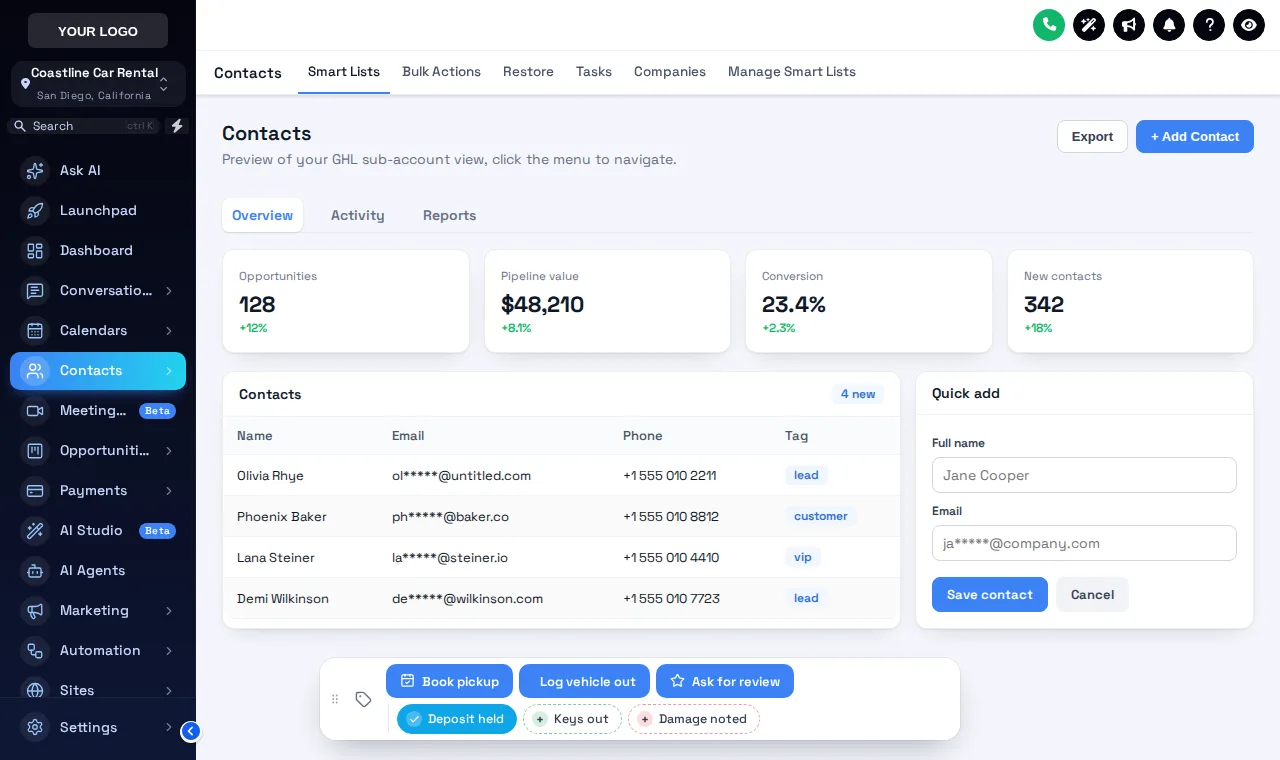
Tap a tag, open a form, drag the bar
The real bar, set up with Deposit held, Keys out and Damage noted chips plus Book pickup, Log vehicle out and Ask for review buttons. Nothing is saved.
How to build a one click tag workflow in GHL
Create the tags your workflows listen for
In GoHighLevel, build workflows with a "tag added" trigger, for example deposit held, keys out or damage noted.
Add quick tags and buttons
In the customizer, add a quick tag chip for each, and buttons that add, remove or toggle tags or open a short form.
Link form fields to custom fields
For a button like Log vehicle out, link each form field to a contact custom field: vehicle and plate, odometer out, return due.
Choose position and who sees it
Place the bar in one of 6 positions, let staff drag it, and show each button in all sub-accounts or only the ones you pick.
Buttons worth putting on the bar
Deposit held · Keys out
Start the pickup checklist SMS and the return reminder sequence the moment the car leaves the lot.
Damage noted · Clean return
Branch to a manager alert and task, or straight to the review request.
Log vehicle out
A form for vehicle and plate, odometer out and return due, saved to custom fields on the renter.
Account renter · PO received
Tags that route corporate renters to the right billing and approval workflow.
Contact actions start at Premium
Does not include this module. Upgrade to a higher class for it.
Includes contact actions bar.
Includes contact actions bar.
GHL contact action buttons FAQs
What are GHL contact action buttons?
A bar on every GoHighLevel contact record with one-tap quick tags and buttons. A quick tag adds or removes a tag, which can start a workflow. A button can do the same or open a short form that fills custom fields.
Can a button start a GoHighLevel workflow?
Yes. Buttons and quick tags add, remove or toggle tags, so any workflow with a "tag added" or "tag removed" trigger starts from one press.
How does it change the contact?
Through GoHighLevel's own API, with the signed-in user's session, the same calls GoHighLevel's interface makes. A user can only do what their GoHighLevel permissions already allow.
Which custom fields can a form fill in?
Any custom field in the sub-account, found by name, key or id. Field types include text, paragraph, number, date, drop-down, email, phone and link, and any field can be required.
Does it leave a record on the contact?
If you want one. Notes can be added saying which tag was added or removed and by whom, and which field changed from what to what, which helps when a deposit or damage question comes up later.
Can different sub-accounts get different buttons?
Yes. Each chip and button can be limited to a list of sub-accounts or shown in all of them, so an airport location and a downtown lot can have different actions.
Is anything saved when I use the test drive?
No. The test drive runs the real bar on a sample page, but nothing is sent anywhere. Inside GoHighLevel the same presses update the contact.
Which class includes contact actions?
Premium ($427) and Fleet Luxury ($867). It is not part of Economy.
Where can the bar sit?
In 6 positions: bottom center, bottom left, bottom right, top center, top left or top right. Staff can drag it if you allow it.
Related pages
One tap, one workflow
Contact actions come with Premium, along with the dashboard and pipeline designers. $427 once.
GoHighLevel and HighLevel are trademarks of HighLevel Inc. GHL Car Rental Snapshot is independent and is not affiliated with, endorsed by or sponsored by HighLevel. The GHL Customizer runs on the GHL Customer Care customizer platform; accounts sold here are created on that platform.