

It is 6:50pm on a Thursday and a renter is standing at your lot with a debit card and a reservation you took over WhatsApp. The agreement is a photo of a photo, half of it cut off. The deposit is a number you said out loud once. No signature, no ID on file. You hand over the keys because the alternative is losing the rental, then spend four days hoping the car comes back clean and the card does not bounce.
Here is the short version so you can stop white-knuckling every handover. A digital rental agreement is a real contract the renter signs on their phone before pickup, backed by a card-on-file authorization hold, a verified ID, and a stored record you can pull up in ten seconds. Under the federal ESIGN Act, that e-signed agreement is just as binding as ink on paper (Cornell Law, 15 U.S.C. 7001). The whole flow runs automatically, from booking to the signed PDF in your files. This post walks the system, where it breaks, and the copy you can steal.
Key Takeaways
- An e-signed rental agreement is legally binding. The ESIGN Act says a contract cannot be denied enforceability just for being electronic (Cornell Law); 49 states plus DC follow UETA (DocuSign).
- The signature is valid only if four things are true. Intent to sign, consent to do business electronically, the signature tied to the record, and a retained copy (DocuSign).
- Hold the deposit, do not charge it. An authorization hold reserves funds and can sit up to 28 to 30 days depending on the network (Stripe).
- Check the ID. Fake ID presentments to dealerships and rental companies jumped 21% since December 2024 (IDScan.net).
- Send the sign link compliantly. Registered A2P 10DLC, real consent, no reliance on the dead one-to-one rule (Wiley).
Table of contents
- Why paper and WhatsApp agreements cost you money
- What a real digital agreement flow looks like
- Stage 1: Write an agreement that actually protects you
- Stage 2: Capture consent and the e-signature
- Stage 3: Verify the renter is who they say
- Stage 4: Place the deposit hold, do not charge it
- Stage 5: Countersign at handover with photos
- Stage 6: Store the record so it survives a dispute
- Three ways to run this: solo, 20-car lot, multi-state
- Sending the sign link without a TCPA problem
- Steal these: the messages that move the signature
- Common objections, answered
- Frequently asked questions
Why paper and WhatsApp agreements cost you money
A rental agreement is not paperwork. It is what stands between you and a bad week when a car comes back cracked and the renter denies agreeing to a deposit. If yours lives as a WhatsApp screenshot or a folder of curling printouts, you have a contract you cannot find and cannot prove. Three things go wrong, over and over.
First, you cannot prove what was agreed. When a renter disputes a damage charge with their card issuer, you are the merchant who has to produce evidence. A signed agreement plus timestamped photos is your case; a verbal number and a fuzzy photo is not. Chargebacks cost far beyond the disputed amount once you add fees, lost time, and the goods themselves (Mastercard).
Second, you are handing keys to unverified people. Fake ID presentments to dealerships and car rental companies rose 21% since December 2024, and across a dataset of more than 1.7 million verifications, about 4.15% of IDs showed signs of fraud (IDScan.net).
Third, the manual version leaks bookings. You cannot re-key an agreement at 7pm and answer the next call at once, so one waits, and waiting renters walk. It is the same leak no-show and cancellation recovery plugs.
What a real digital agreement flow looks like
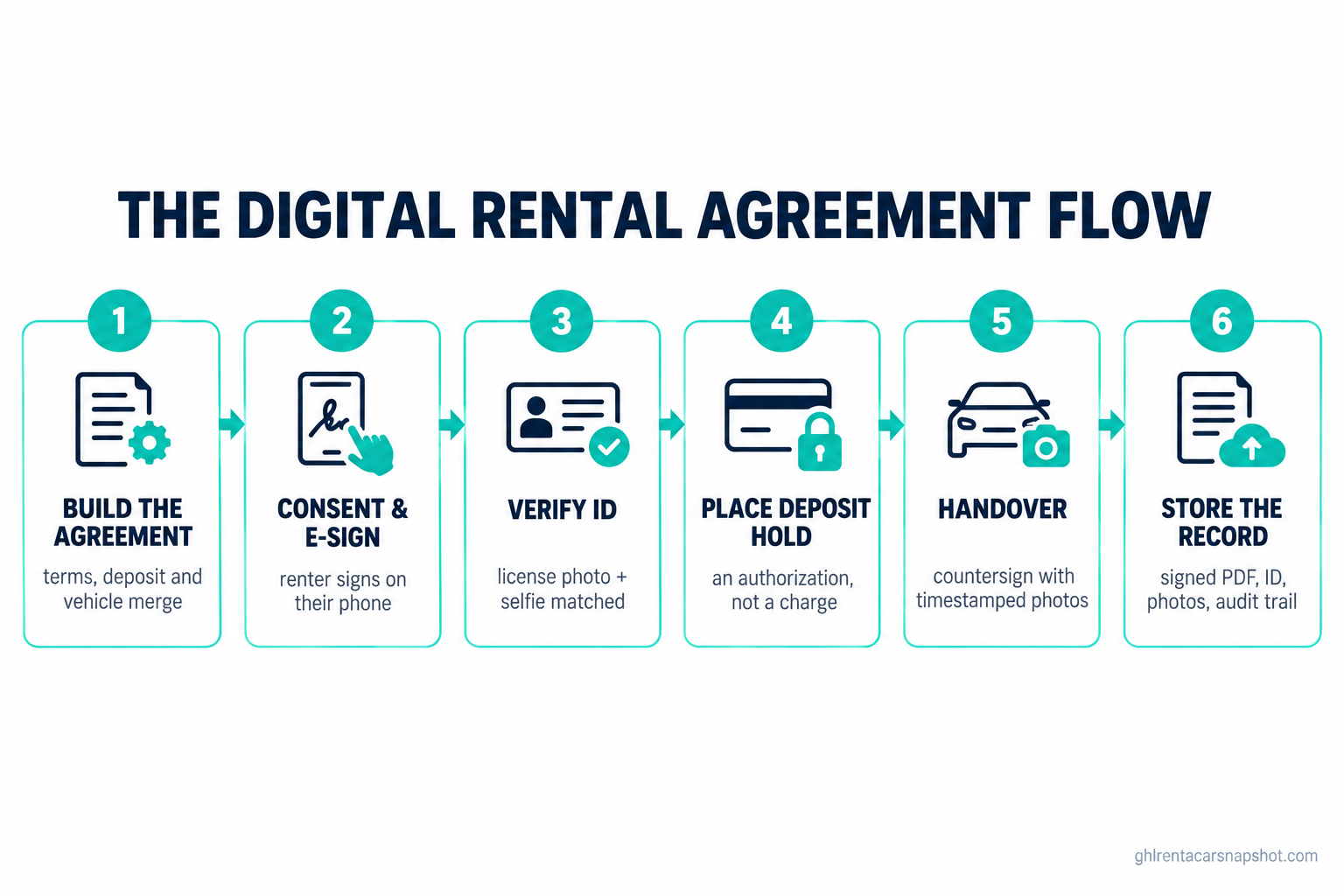
The renter signs before the keys move, every step on its own.
- 1Step 1
Agreement built
Terms, deposit, and vehicle details merge into one document per booking.
- 2Step 2
Consent and e-sign
Renter agrees to sign electronically, then signs on their phone.
- 3Step 3
ID verified
License photo and selfie checked against the booking name.
- 4Step 4
Deposit held
Card authorization hold placed, not a charge.
- 5Step 5
Handover
Countersign at pickup with timestamped photos.
- 6Step 6
Record stored
Signed PDF, ID, photos, and audit trail saved to the contact.
Every stage below has a setup and a failure mode. The failure modes are the part nobody writes about.
Stage 1: Write an agreement that actually protects you
Before any software, you need terms worth signing. An agreement that only says “renter agrees to rent the car” protects nobody; the clauses that save you are the specific ones.
Put these in plain language: the deposit amount and that it is a hold, not a charge; the fuel and mileage policy with real numbers; the late return fee and when it starts, which ties into your late return policy; who is allowed to drive; what happens on damage; and insurance and liability, stated as the renter’s responsibility, since you are the operator and not the insurer.
How it breaks: operators copy a generic template, never adjust the deposit or fee numbers, then try to enforce terms the document does not contain. If it says the late fee is “as posted” and nothing is posted, you have no late fee. Write the numbers into the document, use merge fields so the deposit and vehicle change per booking, and have a lawyer read the final version once before you rely on it.
Stage 2: Capture consent and the e-signature
This is where the legal weight lives. An electronic signature is binding under the ESIGN Act, which says a contract cannot be denied legal effect solely because it is electronic (Cornell Law). At the state level, 49 states plus DC have adopted UETA, with New York running its own equivalent (DocuSign). The tool is legal everywhere you are likely to operate.
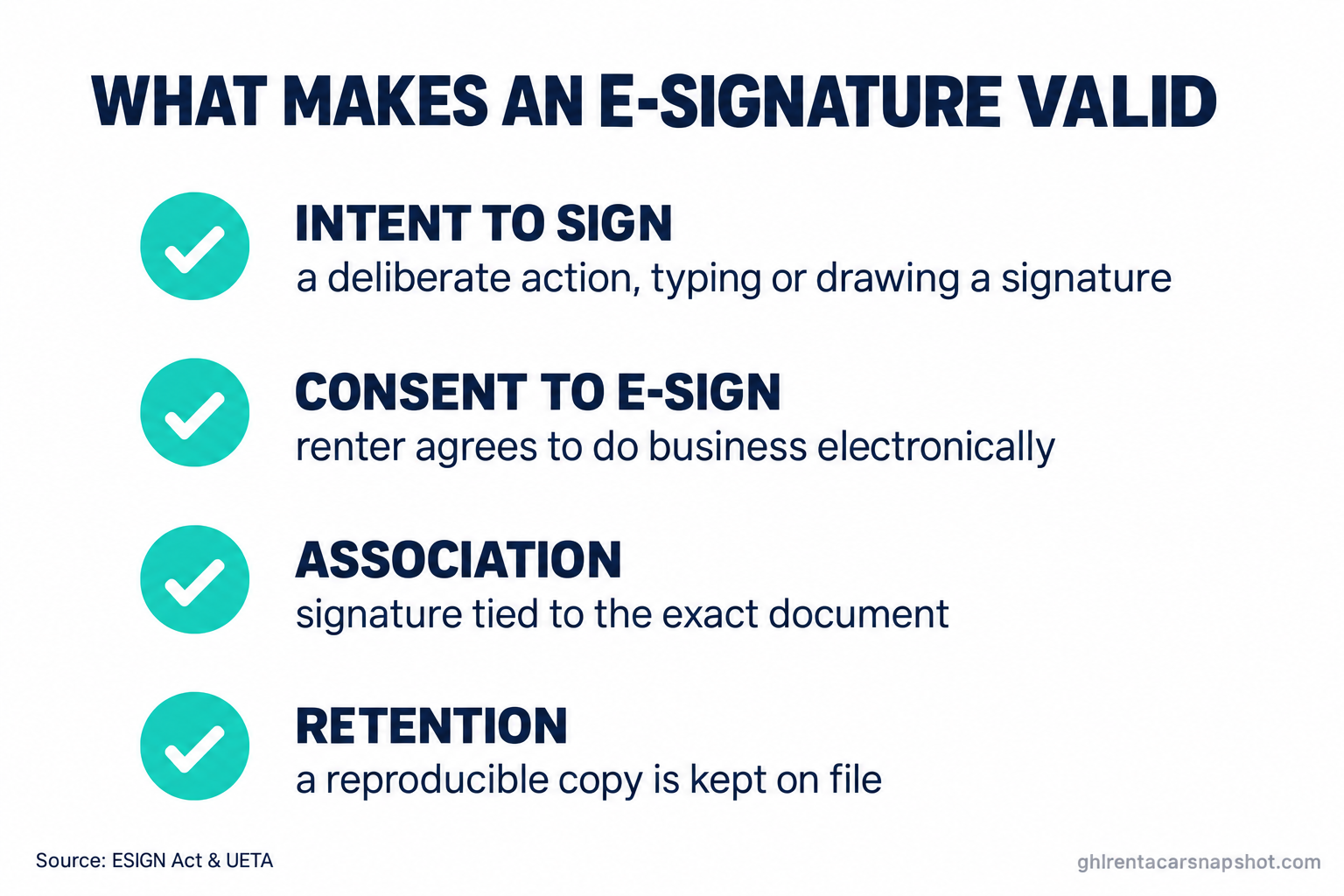
But an e-signature is valid only if four things are true (DocuSign):
- Intent to sign, shown by a deliberate action like typing a name or drawing on the screen.
- Consent to do business electronically, which one checkbox handles.
- Association with the record, so the signature is tied to the exact document.
- Retention, so the signed record can be kept and reproduced later.
The consent checkbox is the one people skip, so make it explicit and log it.
How it breaks: the renter signs a blank or half-merged document because it generated before the vehicle was assigned. Fix the order: assign the vehicle, merge the fields, then send the sign request.
Stage 3: Verify the renter is who they say
A signature on the wrong person’s name is worse than no signature. Before the deposit and the keys, confirm the license is real and matches the booking: collect a clear photo of the front and back of the license and a selfie, and check the name against the reservation. Software can compare the two and flag mismatches.
With fake ID presentments up 21% since December 2024, and roughly 4.15% of automotive IDs showing fraud signs across a 1.7 million transaction dataset (IDScan.net), “they seemed fine” is not a policy.
How it breaks: you collect the ID but never look before handover, so the check is theater. Build a hard stop: no deposit hold and no key handoff until the ID step is marked verified. On reservation automation, that stop is a stage the booking cannot skip.
How long a deposit authorization hold can sit on a renter’s card, in days: a few days is typical, but the network maximum is longer. Source: Stripe.
Stage 4: Place the deposit hold, do not charge it
The deposit is what renters argue about most, so get the mechanics right. You want a card authorization hold, which reserves funds without moving money: you release it on a clean return, or capture what you are owed against it for damage, backed by your photos.
Holds are not instant, though. A typical hold releases in a few days, but rental holds can sit up to 28 days on Visa and up to 30 days on Amex, Mastercard, and Discover depending on the issuer (Stripe). Say so at booking, so a normal hold does not become an angry call.
How it breaks: you charge the deposit instead of holding it, then have to refund it, which reads as a double hit. Or you place the hold and forget to release it on a clean return. Automate the release the moment the return checklist is marked complete, and the same deposit workflow that recovers abandoned bookings can handle the timing. State the hold amount in the agreement and the sign-request text, because a renter who signed for a clearly stated 500 dollar hold almost never wins a dispute over it.
Stage 5: Countersign at handover with photos
The car is still on your lot, so the handover is your last chance to lock in the record. Do a quick walk-around, take timestamped photos of every panel, the odometer, and the fuel gauge, and have the renter confirm the vehicle matches the agreement.
This is the step that wins damage disputes. A signed contract tells the issuer the renter agreed to the terms; photos out and back tell them the damage happened during the rental. That pairing is close to unbeatable, the idea behind damage photo and deposit-dispute protection.
How it breaks: the photos live on someone’s personal phone and are gone by the time you need them. Store them against the booking automatically. If it is not attached to the contract, it does not exist when the dispute lands.
Stage 6: Store the record so it survives a dispute
The last stage is the boring one that saves you. Every booking should end with one bundle tied to the renter’s contact: the signed agreement PDF, the ID images, the consent log, the photos out and back, and the audit trail showing who signed and when.
Retention is not optional. It is the fourth requirement of a valid e-signature (DocuSign), and it is what you hand an issuer during a chargeback. When a dispute arrives 40 days later, you should be able to pull the whole bundle in the time it takes to search a name.
How it breaks: the record is spread across three tools, so assembling it takes an hour you do not have and you miss the issuer’s deadline. Keep it in one place from the start.
Three ways to run this: solo, 20-car lot, multi-state
The same flow, run three different ways depending on your size.
Solo host, 5 to 15 cars, coming off Turo. You are probably a power host building a direct brand to escape platform commission, the way we covered in Turo versus your own booking system. Turo reported roughly 150,000 active hosts and about 350,000 active vehicle listings as of late 2024 (TechCrunch, Feb 2025), many hitting the same wall you are. Keep it lean: one agreement template, a phone e-sign link at booking, a card hold through your processor, a folder per renter. You run it yourself and stop improvising the contract on the lot.
20-car lot, 2 to 3 staff. The risk now is inconsistency between whoever is on the counter. Standardize hard: one pipeline every booking flows through, with the ID check and signed agreement as stages a booking cannot skip, and the deposit hold and release firing on pipeline movement, not on someone remembering.
Multi-state or airport-adjacent. Your agreement is no longer one document. Deposit rules differ by state, so the right terms merge based on pickup location, and your messaging must respect the strictest state you touch. If any renters are in Florida, that state sets your floor. Get the multi-state version reviewed once by counsel, then let the system pick it per booking.
Sending the sign link without a TCPA problem
The sign request usually goes out by text, because that is what gets read. SMS open rates run up to 98% for opt-in messages, far above email (Sender). But a text is where operators walk into trouble.
Register for A2P 10DLC before you send business texts, or carriers block them. From June 30, 2026, campaign registration also requires a Privacy Policy URL and a Terms and Conditions URL, or the campaign is rejected (Twilio). Capture consent at booking and log it. Do not build around the old one-to-one consent rule, which the Eleventh Circuit vacated in January 2025 and which was then repealed, so it is not current law (Wiley).
Florida is the state that ends programs. The Florida Telephone Solicitation Act lets a renter sue you directly for 500 dollars per violating text, trebled to as much as 1,500 dollars for willful violations, plus fees (Morrison Foerster). The full playbook is in texting rental reminders without a TCPA or 10DLC disaster.
Steal these: the messages that move the signature
The flow only works if the renter actually signs. Keep each message short, clear, and specific about what happens next. Paste these in and change the brackets.
These messages carry a renter from booking to a signed contract with a held deposit, zero improvising on the lot. Keep them boring; boring gets signed.
Common objections, answered
“Won’t a signing step scare renters off?” The opposite. Renters about to hand over a card deposit want the terms in writing, and a clean two-minute phone sign feels more professional than a clipboard. The signature is a trust signal, not a hurdle, as long as it is short.
“I already use paper and it has been fine.” Fine until the first real dispute, when paper cannot prove who signed or when, cannot produce a consent log, and cannot be searched at 9pm. Paper is fine the way no insurance is fine, right up until you need it.
“What if the renter refuses to sign or verify?” Then they do not get the car, and you just avoided your worst rental. Someone who will not confirm their identity or agree to the deposit in writing is the exact person a dispute comes from. Keep the hard stop hard.
Frequently asked questions
Digital rental agreements and e-sign, answered
Is an e-signed car rental agreement legally binding in the US?
Yes. Under the federal ESIGN Act, a contract cannot be denied legal effect solely because it is electronic, and 49 states plus DC follow UETA (New York uses its own equivalent). As long as the signature captures intent, consent to sign electronically, association with the document, and a retained copy, it is as binding as ink.
What is the difference between a deposit hold and a charge?
A hold, or authorization, reserves funds on the card without moving money. You release it on a clean return or capture against it if there is damage. A charge takes the money immediately and has to be refunded, which reads as a double hit. For rentals, always use a hold.
How long does a rental deposit hold stay on the card?
A typical hold releases in a few days, but rental holds can sit longer, up to about 28 days on Visa and up to 30 days on Amex, Mastercard, and Discover depending on the issuer. Tell renters this at booking so a normal hold does not become a complaint.
Do I have to verify a renter's ID before pickup?
You should. Fake ID presentments to rental companies and dealerships rose 21% since December 2024, and a meaningful share of automotive IDs show fraud signs. A license photo and a selfie matched to the booking name is a cheap check against handing a car to the wrong person.
Can I text the signing link to the renter?
Yes, compliantly. Register for A2P 10DLC, log consent at booking, and from June 30, 2026 have a Privacy Policy URL and Terms URL on your campaign. Do not rely on the old one-to-one consent rule, which was vacated and repealed in 2025. Florida needs extra care because the FTSA lets renters sue directly.
The last handover
Back to that Thursday at 6:50pm. Run the same rental through a real flow and it looks different. The agreement was signed on the renter’s phone at booking, the deposit hold is placed, the ID matched, and the photos are attached before the renter arrives. The handover is a handshake and a set of keys. When the car comes back Sunday, the hold releases on its own.
That is the difference between hoping and knowing. The contract is not paperwork you do after the rental. It is what makes the rental safe to do at all, and once it runs itself, you get your Thursdays back.
Julian Cardoza is an independent fleet operations advisor. This article is general information for car rental operators, not legal advice. Rental-agreement terms, deposit handling, ID verification, and state licensing remain the operator’s responsibility. Confirm your agreement and consent language with a licensed attorney in your state.